
On Page SEO Optimization Tutorial: Simple Step-by-Step Guide for Beginners
If you want your website to rank higher on Google, learning on page SEO optimization is necessary. On-page SEO refers to all the strategies applied directly on your web pages to make them more search-engine-friendly. This tutorial will guide you through the basics, key factors, and helpful tools to improve your website’s performance.
What is On Page SEO?
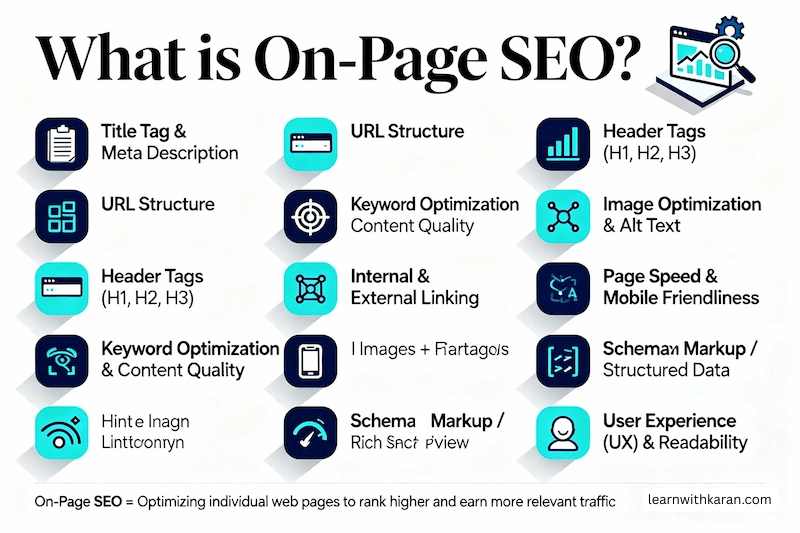
What is on-page SEO? Simply put, it is the process of optimizing individual web pages to rank higher in search results and attract relevant traffic. It involves improving titles, headings, content quality, meta descriptions, URLs, images, and internal linking. On-page SEO not only helps search engines understand your content but also enhances user experience, making your website easier to navigate.
What is On Page SEO Optimization?
On-Page Optimization means improving the content and structure of your website pages so that Google and other search engines can easily understand them, and users can read them comfortably.
It includes things you do inside your website pages, like using keywords, writing good titles, adding headings, optimizing images, improving speed, and internal links etc.
In simple words
On-Page Optimization – All the activities done inside a website page to improve ranking on search engines.
An example:
If you write a blog about “Best digital marketing courses in Noida”, then:
- You add this keyword in the title, URL, H1, and the first paragraph
- You write helpful content
- You add images with alt text
- You link to other related pages
- You make sure the page loads fast and works on mobile
All these actions are On-Page SEO.
Why is On Page SEO Important?
Reason |
Benefit |
| Helps Google understand your topic | Better ranking in search |
| Improves user experience | More time spent on your site |
| Increases click-through rate | More traffic |
| Helps target the correct audience | More conversions/sales |
What Are Key Factors?
Before learning about the key factors for On-Page SEO Optimization, we first need to understand what the term “key factors” actually means. Knowing this will help you clearly understand why these elements are important and how they impact your website’s ranking.
Key factors means the most important things or important points that you must focus on to achieve a result or success.
Or
Key factors – important elements that play a major role in getting a good result.
An example
If you want to make a perfect tea, the key factors are:
- Tea leaves
- Milk
- Sugar
- Water
- Proper boiling
If any of these are missing or not correct, the tea will not taste good.
So these important items = key factors
In SEO context
When we talk about Key Factors for On-Page SEO Optimization, we mean:
- The important things that you must improve on a webpage to help it rank on Google.
Key Factors for On-Page SEO Optimization
Key factors for On-Page SEO Optimization are the most important elements of a webpage that you need to improve to help your website rank higher in Google.
These factors tell search engines what your content is about, how useful it is, and how well it serves the user.
In simple words:
Key factors = Important parts of a webpage that must be optimized for better ranking and better user experience.
These include things like:
- Title tags
- Headings (H1, H2)
- Keywords
- Meta description
- Content quality
- Images and alt text
- Page speed
- Internal links
- Mobile friendliness
When these factors are properly optimized, Google understands your page better and shows it higher in search results.
Example
If your page title, headings, and content clearly talk about “On-Page SEO Optimization” and everything is well-structured, loads fast, and gives good information, Google will consider your page valuable and rank it higher.
Here are the most important steps to focus on for effective on-page SEO optimization:
1. Optimize Title Tags and URLs
- The title tag is the headline that appears on Google search results.
- It should clearly explain what your page is about.
- Add your primary keyword at the beginning if possible.
- Keep the title between 50–60 characters for best visibility.
- URL should be short, clean, and contain the main keyword.
Example:
❌ www.site.com/12345-pq?=blog-post
✔️ www.site.com/on-page-seo-optimization
2. Use Primary Keyword in H1 and Introduction
- The H1 tag is the main heading of the page.
- Search engines read it first to understand the topic.
- Include your primary keyword naturally in the H1.
- Also, add the keyword in the first 100–120 words because Google gives more weight to the beginning part of the content.
3. Write a Strong Meta Description
- This is the short summary shown under your title on Google results.
- It should be 150–160 characters and attractive to make users click.
- Include your primary keyword and a call to action.
Example:
Learn simple steps for on-page SEO optimization to rank higher and drive more traffic.
4. Use Proper Headings (H2, H3)
- Divide content into sections using H2 and H3 headings for readability.
- Add secondary or LSI keywords naturally inside these headings.
- It helps search engines understand content structure and relevance.
5. High-Quality Content
- Content should be unique, helpful, and answer what the user is searching for.
- Include examples, images, FAQs, statistics, steps, etc.
- Avoid keyword stuffing (overusing the keyword repeatedly).
6. Maintain keyword density around 1-1.5%.
- Optimize Images with Alt Text
- Search engines cannot see images, they read alt text to understand them.
- Use short descriptive alt text with relevant keywords.
Example: on-page SEO optimization checklist image
7. Internal Linking
- Link your page to other related pages on your site.
- Helps users stay longer on your website and improves ranking.
Example:
- linking “SEO Basics” article to “On-Page SEO Guide”
- Use descriptive anchor text, not generic text like “click here”.
8. Improve Page Speed & Mobile Friendliness
- Page load speed is a major Google ranking factor.
- Compress images (use WebP format)
- Use caching and remove heavy plugins.
- Check speed using tools like PageSpeed Insights / GTmetrix
- Ensure the website is responsive and looks good on mobile, tablet, and desktop.
9. Bonus Points
- Use Schema Markup to improve appearance in search results (rich snippets)
- Add an FAQ Section to increase the chances of appearing in Google’s FAQ rich results
- Use HTTPS (SSL) to improve trust and ranking
- On-Page SEO = Content quality + Keyword placement + User experience
Best WordPress Plugins for On-Page SEO Optimization
If you use WordPress, plugins can simplify your on-page SEO efforts. Popular options include:
- Yoast SEO – Helps optimize titles, meta descriptions, content readability, and keyword placement.
- Rank Math – Offers step-by-step on-page SEO guidance and integrates with Google Search Console.
These plugins make it easier for beginners to apply SEO best practices and track improvements on their website.
Best Search Engine Optimisation Tools for Beginners
Using the best search engine optimisation tools helps monitor your website performance and identify areas for improvement. Some beginner-friendly tools include:
- Ubersuggest – Keyword ideas and content suggestions.
- KWFinder – Great for finding long-tail keywords and local SEO.
- Ahrefs Free Keyword Generator – Discover new keyword opportunities.
- WordStream Free Tool – Simple, beginner-friendly keyword research tool.
These tools complement your on-page SEO work by helping you optimize content and track results effectively.
Final Thoughts
On-page SEO optimization is the foundation of a successful website. By understanding what is on-page SEO, applying the key factors consistently, using the right WordPress plugins, and leveraging the best search engine optimisation tools, beginners can improve rankings, attract more traffic, and gain hands-on SEO experience. Start with small improvements and stay consistent – over time, they lead to significant results.
Also read: Why Most Students Fail in Digital Marketing